Family Storage

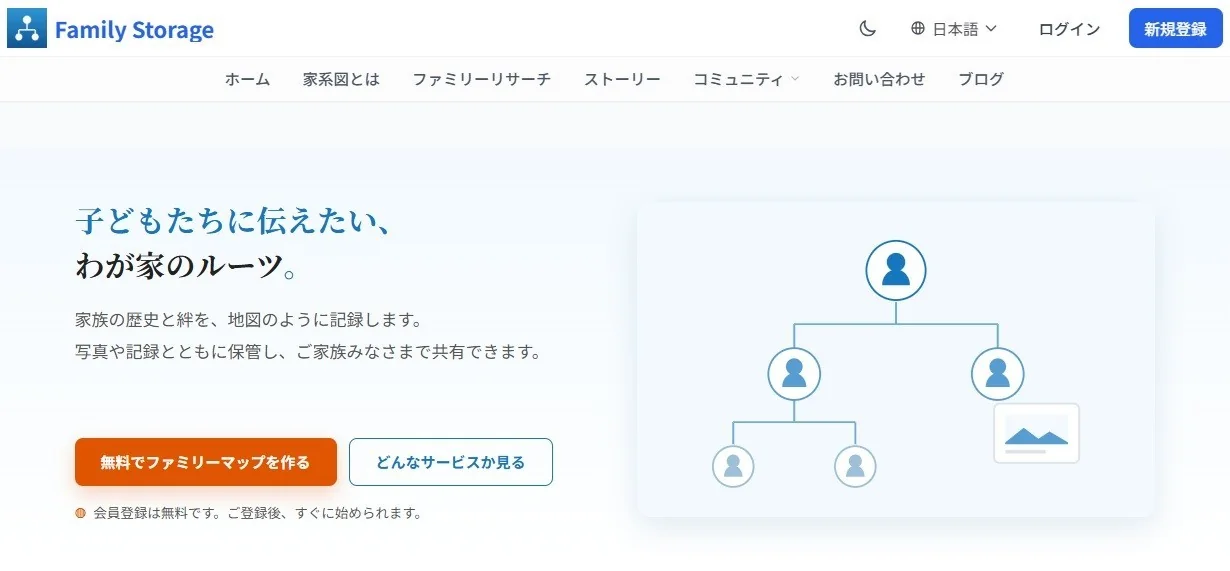
Our family's roots,
to pass on to our children.

Record your family's history and bonds like a map.
Keep them together with photos and records, and share them with your whole family.

◍Signing up is free. You can start right after registering.
What You Can Do

Your family's records, in four ways.

We carry over the four features you use today as they are, and rebuild them to be easier to read and use.

Family Map

Parents and children, brothers and sisters, aunts and uncles, nieces and nephews. Expand the map of the family closest to you.

Carried over + finger controls

Family Data

You can write in family data, personal data and many other things.

Carried over + easy to read on smartphones

Family Events

Manage important days such as birthdays, wedding and birth anniversaries, and Buddhist memorial services.

Carried over + calendar sync

Family Sharing

By sending an invitation email, you can share all your data with your family.

Carried over + reliable invitation emails
Family Map 2.0

Why not complete your family tree
with Family Map 2.0?

Registration is free. You can start keeping your family's records today.

Sign Up Free

You can also sign up with a Google or LINE account.

Family Map

Your whole family, in one family tree.

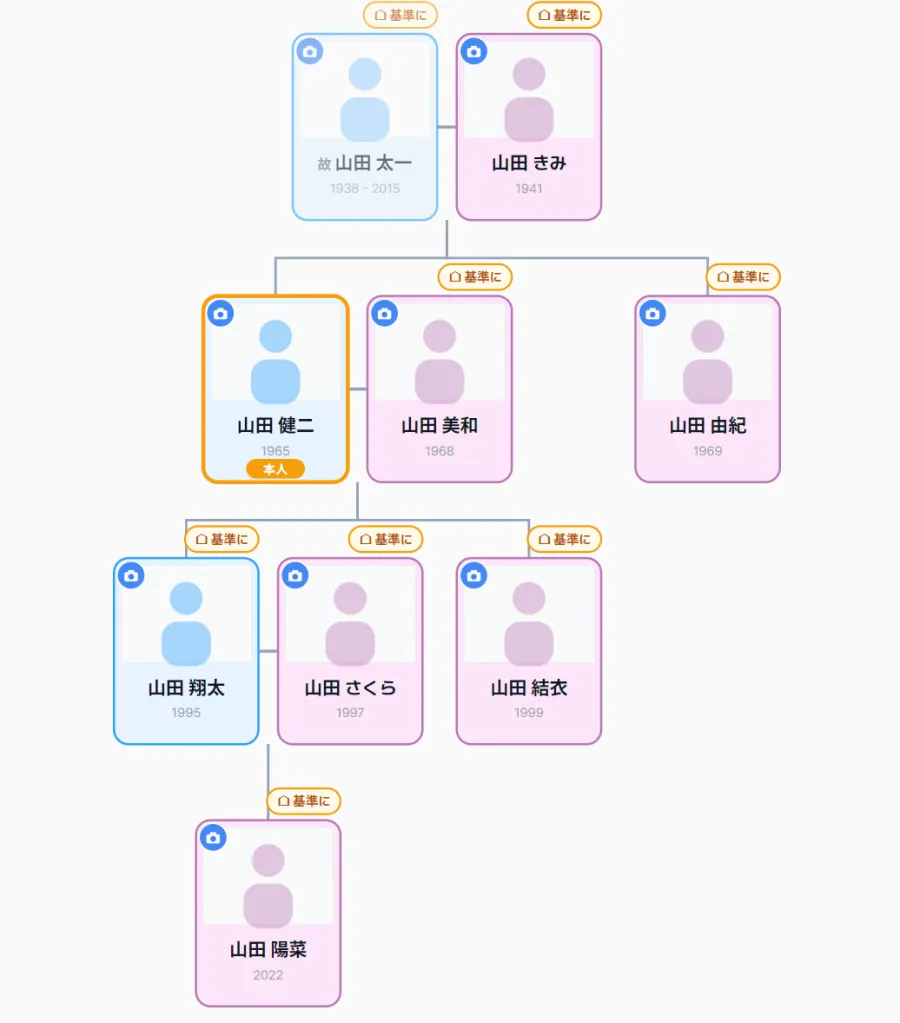
A family tree you can move with your fingertip. Photos, relationships and memories — all together on one screen.

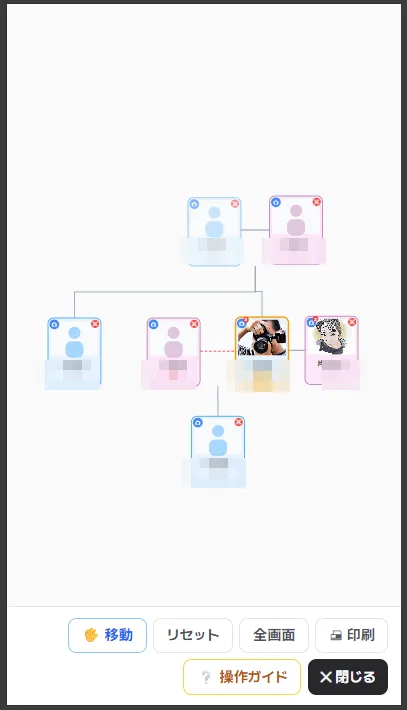
An interactive family tree

An interactive family tree

Connect your family with lines and see generations, couples, parents and children, and siblings at a glance. Drag to move, pinch to zoom in and out, and auto-arrange with a single tap.

  • You are highlighted in orange
  • Deceased family members and divorces are gently noted on the cards
  • Clear lines for siblings, spouses, parents and children
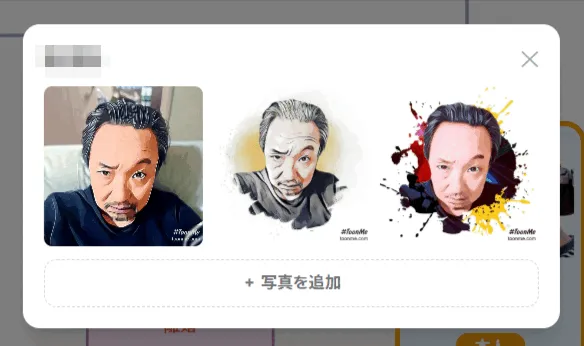
A photo gallery for each person

A photo gallery for each person

You can register multiple photos for each person. Keep your precious memories together; only family and relatives who know the link can view them.

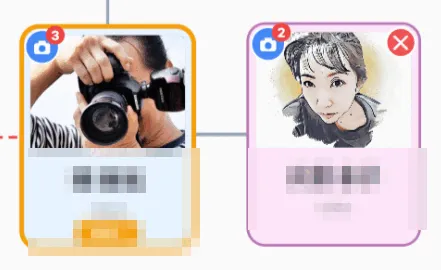
  • A count badge on each card shows at a glance whether there are photos
  • Unguessable URLs, viewable only by those who know the link
  • Add photos straight from your smartphone
Cards that show your family today

Cards that show your family today

Easy-to-read vertical cards, color-coded by gender. Photo, name, birth year and relationship, all on one card.

  • Men and women shown in different colors
  • Your photos appear right on the card
  • A "Me" badge makes the center clear
Edit on your smartphone, then print or share as a PDF with your family

Freely, with your fingertip, even on a smartphone

On the train or at your parents' home. Even without a computer, you can edit your family tree right from your smartphone or tablet. The "Guide" at the top of the screen explains how to use it, so first-time users can feel at ease.

  • Move cards with your finger and arrange them freely
    Switch to "Select mode" and you can pick up cards with your finger and move them wherever you like. When everything looks right, tap "Save layout." The next time you open it, the arrangement will be just the same.
  • Zoom in and out with two fingers
    Whether you want to see the whole picture or make small adjustments, it works just like a map.
  • Select several and move them at once
    Trace over an empty area with your finger to select a range. You can move a whole household together.
  • Add family members on the spot
    Tap a card to add a spouse, children, parents or brothers and sisters. Just enter a name, and the lines connect automatically.
  • Photos, on the spot too
    You can add photos from your smartphone to a card right away. Keep as many as you like for each person.

Print or save as PDF to hand to your family

Print your finished family tree as it is. Save it as a PDF and give it to family and relatives who live far away.

  • Save your family tree as a PDF and share it
  • Full-screen view with an operation guide
  • Easy to follow, even for first-time users
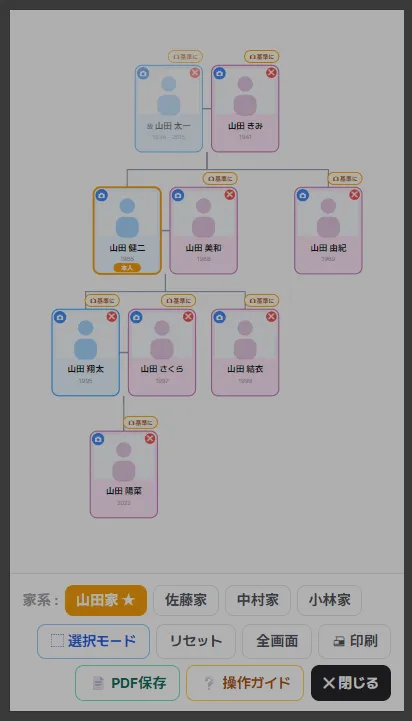
Family lines of birth families

Trace the lines of the families you married into, separately

In Japan, a married couple shares the same surname. So if you register a maiden name, you can switch to the family your mother or grandmother came from as a separate "family."

  • Move between each "○○ family"
    Your own family always comes first, so you can go back at any time.
  • Just fill in the maiden name field
    All you need to do is enter the "Maiden name" on the family member's edit screen.
  • Your mother's and wife's ancestors too
    You can trace back their original families and create them as separate family trees.

Since 2015 · Trusted

We are family history experts
who have provided many family trees
for NHK "Family History" (TV program).

Eleven years of proven experience working with family histories.
Now we bring that expertise to a new "platform for stories."

◍ Tradition Blue Co., Ltd.↗
Family Storage

Just by keeping records, your family comes into view.

The records you gather about your family reveal all kinds of things. Special days appear automatically, and memories come alive as stories.

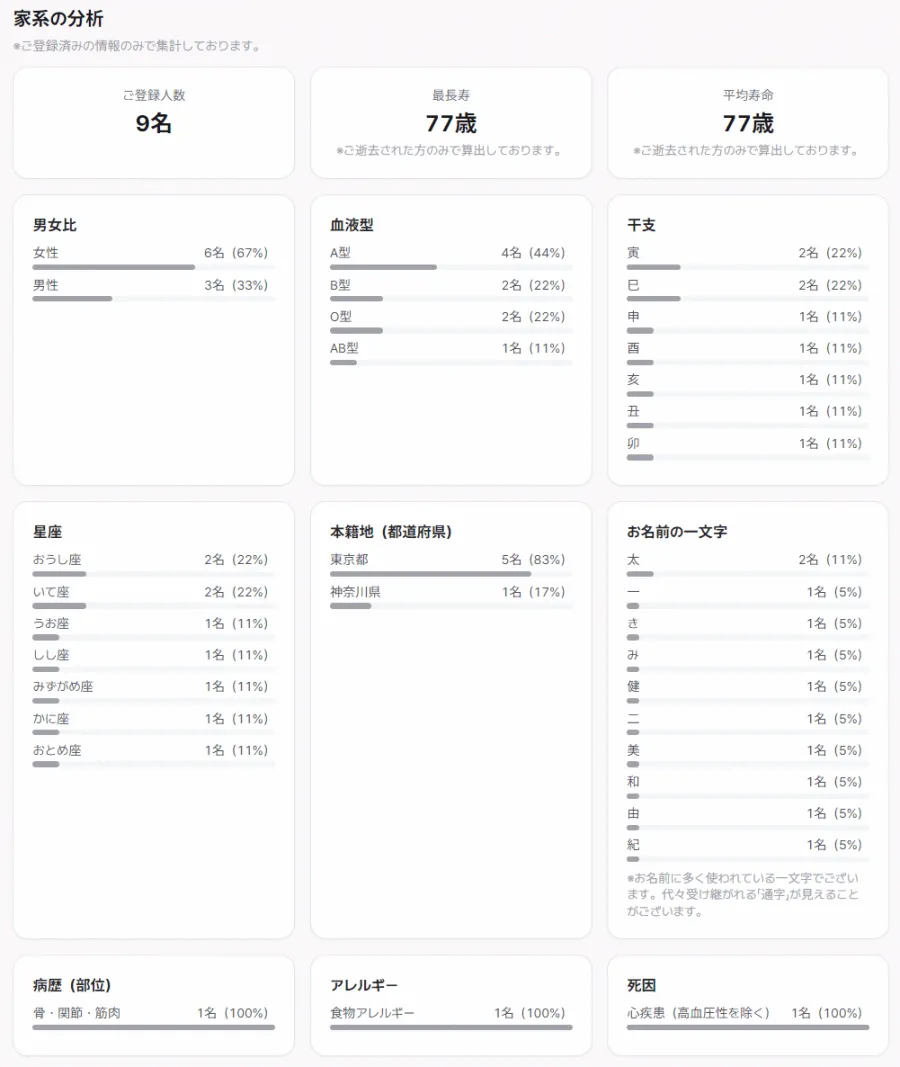
Family line analysis

See your family in numbers

The more people you register, the clearer the picture of your family becomes. No complicated steps are needed. Just keep records, and everything is organized automatically.

  • Longest life and average lifespan
    See how long your ancestors lived.
  • Zodiac signs, blood types and gender ratio
    Calculated automatically from dates of birth.
  • Characters in given names
    You may discover a “family character” passed down through the generations.
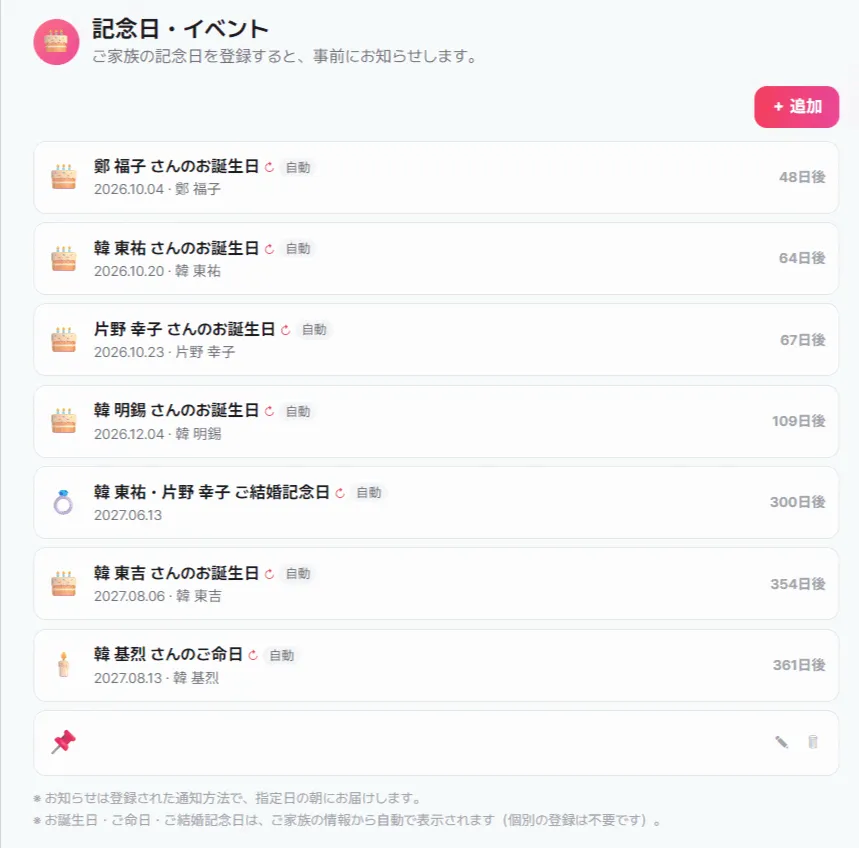
Special Days

Special days appear without registering them

Birthdays, death anniversaries and wedding anniversaries are shown automatically from your family's information. There is no need to register them one by one.

  • Items marked “Auto” need no registration
    Update your family's information and the changes are reflected right away.
  • See at a glance how many days are left
    Listed in order, starting with the nearest.
  • Advance reminders
    Never forget events that need preparation, such as memorial services.
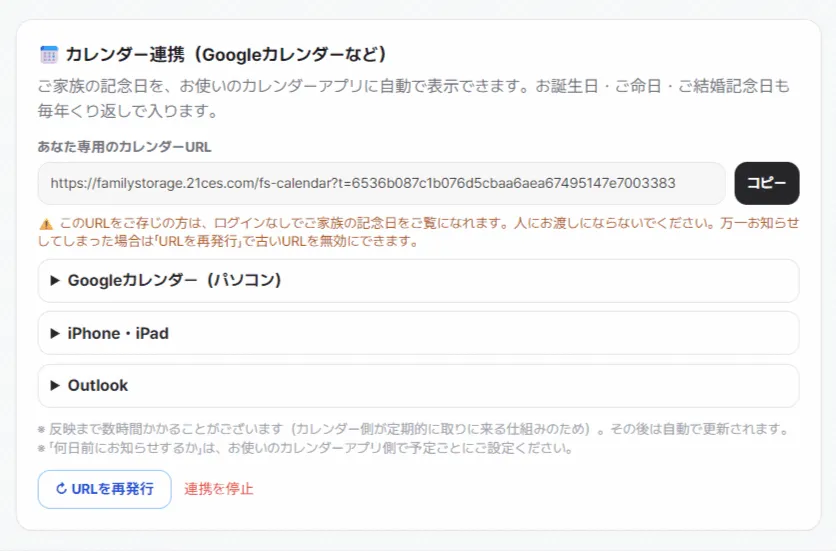
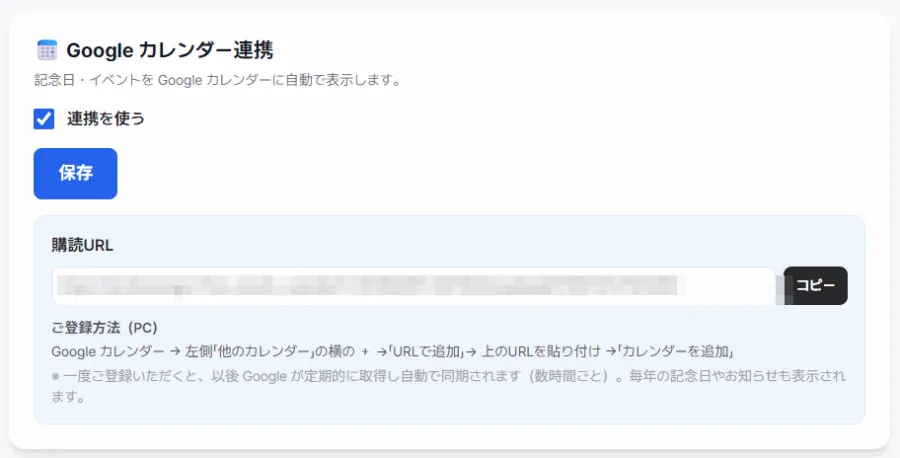
Calendar Sync

Right in the calendar you already use

You can show your family's special days in Google Calendar or your iPhone calendar. They are added as yearly recurring events, so you only need to set it up once.

  • Just add a URL
    No account linking or extra apps needed.
  • Works with Google, iPhone and Outlook
    Step-by-step instructions are shown on screen.
  • Reminders are set in your own calendar
    You are free to choose how many days in advance.
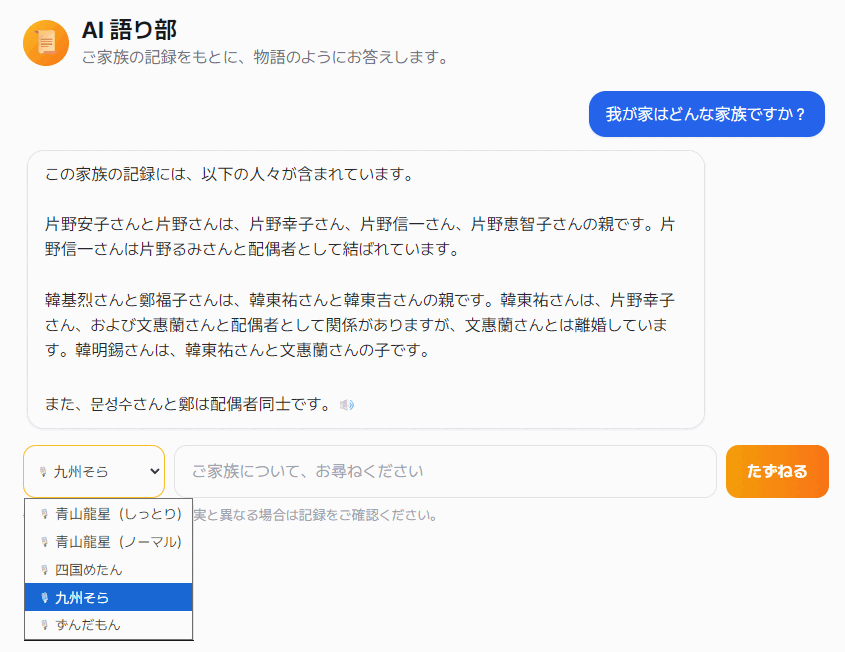
AI Storyteller

Ask about your family

Based on the records you have gathered, the AI answers like a storyteller. You can confirm in words how each person is connected.

  • It speaks only about what is in your records
    Your family's information never leaves our service.
  • You can also listen
    You can choose the reading voice.
  • For older family members too
    Those who find reading the screen difficult can enjoy it by ear.
Google Calendar Sync

Your anniversaries, in the calendar you already use.

Just turn it on in My Page settings. Your family's anniversaries and events will automatically appear in your Google Calendar.

Google Calendar sync
  1. 1
    Turn it on in settings

    Save "Use calendar sync" in My Page settings, and your own personal subscription URL will be shown.

  2. 2
    Add it to your calendar once

    Just paste it into "From URL" in Google Calendar. No complicated settings needed.

  3. 3
    Then it syncs automatically

    Yearly anniversaries and advance reminders alike are updated automatically every few hours.

* No extra app to install. Check everything in your usual calendar, on a smartphone or a computer.

We gently remind you of the days you don't want to forget.
And whenever you have a question, we're here to help.

Family Storage is not just a place to keep records.
It quietly stays by your side in your days with your family.

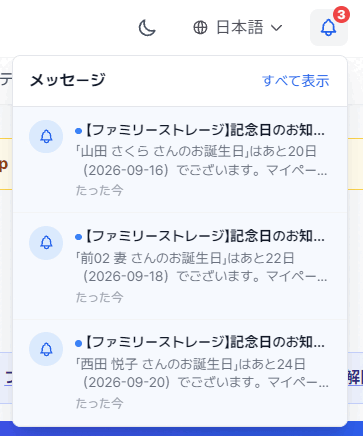
Anniversary reminders
Anniversary Reminders

Birthdays and death anniversaries alike.
We'll be the ones to remind you.

We automatically find important days in the family records you have registered and let you know. There is no need to enter the dates again yourself.

  • Birthdays, death anniversaries and wedding anniversaries, automatically
  • Reminders 3 months, 2 months and 1 month before
  • On-screen notices, email, and smartphone notifications
  • Can also be imported into Google Calendar and others
  • You can choose when to be reminded
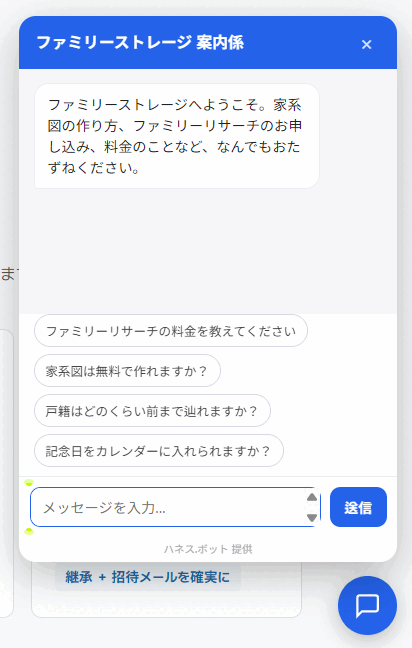
Help chatbot
Help Chatbot

Our guide is by your side,
24 hours a day.

It has read all 52 pages of this site, so it can answer your questions on the spot — about Family Research, fees, how to apply and more. Please feel free to ask, even late at night.

  • Has read all 52 pages of this site
  • Ask anytime, as many times as you like
  • Answers in Japanese, Korean and English
  • Saves you the trouble of contacting us
  • Open it from the button at the bottom right of the screen

Both features are available just by signing up (free).

Actual Screens

Large and clear on your smartphone.

16px body text with 1.8 line spacing. Readers of every generation can read it without zooming in.

Family Map
The Sato family · 4 generations, 32 people
Grandpa Dad Uncle Me Sister Selected Ichiro Sato

A family tree that expands with your fingers

Generations are shown by position, not color. Even as the number of people grows, the screen stays tidy.

Family Data
Mr. Ichiro Sato
Date of birth
March 14, 1948
Place of birth
Kurume, Fukuoka
Occupation
Shop owner
Episode
A man of few words, but soft on his grandchildren

Tables become vertical cards

No need to scroll tables sideways on your smartphone. Each item is turned into its own card.

Family Events
Upcoming events
June 15 · in 12 days
Grandfather's 13th memorial service
8 family members notified
July 2
Mom's birthday
September 20
Niece's Shichi-Go-San celebration
+ Add to Google Calendar

So you won't forget

Upcoming events are shown large at the top. You can also add them to the calendar you use every day.

AI Family Storyteller

The records you build up become your family's story.

From the records you have written down, AI turns your family's story into text. You can also listen to it as audio.

AI Family Storyteller
The story of Mr. Ichiro Sato
What kind of person was Grandfather?
Family AI Ichiro was born in 1948 in Kurume, Fukuoka. He built his shop himself, from the ground up. Your family's records say he was "a man of few words, but soft on his grandchildren."
▶ Listen 0:42
  • Based on your records It writes only from what is recorded in the "Family Data" above. It never makes up things that aren't there.
  • Listen by voice For those who find the screen hard to read, or whose hands are busy, we deliver it as a spoken story.
  • In both Japanese and Korean From the same records, we can create the story in either language, so you can share it with family overseas.

* The screen above is a sample. In actual use, the text is created from the records your family has written down.

How It Works

Four steps, and your family's records keep growing.

1

Sign up

Register for free and start right away.

2

Build your map

Expand it little by little, starting with the family closest to you.

3

Photos & records

Keep them together with your photos and records.

4

Share with family

With the whole family, through invitation emails.

Carried Over

Not a single existing feature will be lost.

Even with a complete renewal, the features you have nurtured over the years are carried over as they are.

◍ 100% of current features carried over + new features added

Expand a map of the family close to you

You can expand a Family Map of the family close to you: parents and children, brothers and sisters, aunts and uncles, nieces and nephews, and more.

✓ Carried over + more intuitive controls

Write in plenty of family data

You can write in family data, personal data and many other things.

✓ Carried over + smartphone support

Manage important family events

You can manage family events such as birthdays, wedding and birth anniversaries, and Buddhist memorial services.

✓ Carried over + stronger reminders

Share all your data with your family

By sending an invitation email, you can share all your data with your family.

✓ Carried over + reliable invitation emails
Family Research

For those who want to trace further back.

Our specialists collect family registers (koseki) and related records, and organize information on your family going back about 150 years.

◍ Hover your mouse over a number (or tap it on a smartphone) to see a detailed explanation of that step below.

STEP 1 · Application

  1. Choose a course — "Information gathering only, ¥22,000" or "Information gathering + map creation, ¥55,000."
  2. Choose the number of lineages (surnames) to research. Each surname counts as one lineage, such as "your father's family line" or "your mother's family line." The fee is calculated per lineage.
  3. No payment is made at this point.

STEP 2 · Review

  1. Check the course you chose, the number of lineages and the total amount on screen.
  2. Up to this screen, you can freely add or change things.
  3. We will also give you an estimate of how long it will take to complete.

STEP 3 · Your Information

  1. Enter the requester's name, address and contact details.
  2. Enter the names and registered domiciles (honseki) of the ancestors to be researched, as far as you know them.
  3. You may leave anything you are unsure of blank, as we will research it.

STEP 4 · Letters of Authorization

  1. Print the six letters of authorization from the screen.
  2. Write your name by hand and add your seal.
  3. Put them in the enclosed envelope and mail them to us.

The most difficult partFamily registers cannot be requested without authorization from the person themselves or a relative. For this reason, this one procedure requires paper and a seal. We automatically create the letters of authorization from the details you entered and show you with diagrams where to put your seal and where to send them, so you are less likely to get stuck along the way.

STEP 5 · Payment

  1. Payment is by bank transfer or credit card. We begin the research once your payment has been confirmed.
  2. When the work is complete, we will send you the family registers and related records (and a PDF of your Family Map) (within 60 days of payment confirmation for "Information gathering only," and within 120 days for "Information gathering + map creation").
  3. You can download your receipt from the screen.
Information gathering only
All the family registers, collected together
¥22,000 / per lineage (tax included)
Delivery: within 60 days of payment confirmation
  • Collection of family registers by specialists
  • Information on your family going back about 150 years
  • The collected family registers are sent to you
Learn more
Information gathering + map creation
From tracing the family registers to creating your family tree
¥55,000 / per lineage (tax included)
Delivery: within 120 days of payment confirmation
  • Collection of family registers by specialists
  • Family Map created and sent as a PDF
  • Added straight to the site
Apply for research
NHK
General TV

Production assistance for "Family History." We have created a great many family trees.

Tradition Blue Co., Ltd.
Operating Company

Tradition Blue Co., Ltd.

Family Storage is run by Tradition Blue Co., Ltd., a company experienced in family tree research.

Company Website
FAQ

Frequently asked questions.

What kind of service is Family Storage?

It is a service for reliably preserving and sharing your family's records (family tree, photos, memories and special days). From “Family Research,” which traces the family register (koseki), to creating a family tree, AI storytelling, and managing photos and special days, you can gather your family's story in one place.

Is sign-up free?

Yes. Sign-up is free. Basic use, such as creating a family tree and saving records, is free of charge. Only some services, such as Family Research (family register research), are paid.

Do I need any special knowledge to use it?

No. There are no difficult operations. Simply follow the screens and enter names and records.

Can I use it on a smartphone?

Yes. You can use it on a smartphone, tablet or computer. You can also add it to your home screen and use it like an app (PWA). It launches quickly, and you can also receive notices (push notifications).

How do I create a family tree (Family Map)?

Your family tree takes shape simply by adding family members, starting from yourself. Additions are always registered as “relationships as seen from you,” and you can zoom and move around with your fingertip. You can share your completed family tree with your family by printing it or saving it as a PDF.

Can I manage special days and events?

Yes. When you register birthdays, death anniversaries, other anniversaries and so on, we will notify you automatically as the day approaches (in-app notices, push notifications and email). You can also sync with Google Calendar and check them in your usual calendar.

What is the AI Storyteller (AI storytelling)?

It is a feature in which AI talks about a person based on the family records you have registered. If you ask, “What kind of person was my grandfather?”, it answers within what is in the records. It is designed to be modest: it does not make up things that are not recorded, and instead tells you “That is not in the records.” It can also read aloud, and you can choose a calm voice (Japanese, Korean and English).

Can I save photos for each person?

Yes. From each card in the family tree, you can open a photo gallery just for that person. With a share link, you can also show photos only to your family and relatives (people who don't know the link cannot browse the list).

Does the data I register belong to me?

Yes. The records and photos you register are your own. Please use the service with peace of mind.

How much does it cost to request family registers myself?

The fees for family register (koseki) documents are as follows, per copy (as of September 2026; the amounts are the same in almost all municipalities).

  • Certified copy of the family register (certificate of all matters): ¥450
  • Certified copy of a closed register (joseki) / pre-revision register (kaisei genkoseki): ¥750

If you request them by mail, the issuing fee for fixed-amount postal money orders (¥200 each) and postage both ways are added. The number of documents ranges from a dozen or so to more than thirty depending on the family, and the total generally comes to around ¥10,000 to ¥20,000-something per lineage.

For details, please see The Cost of Making a Family Tree, and for the request procedure, How to Request Family Registers. If you would like us to do it for you, the fees are listed under How much does it cost?

Our family's roots, to pass on to our children.

Signing up is free. Start recording your family's story today.

Sign up for free

You can also sign up with a Google or LINE account.

Column

More

Applying for Family Research — Five Steps and What Happens Before It Begins

Family Research is a service in which specialists trace the ancestors you can...

2026.09.226

The AI Storyteller and Help Chatbot — Asking Your Family's Records

“What kind of family are we?” — the AI Storyteller answers like a story, base...

2026.09.216

Inviting Your Family to Build It Together

A family tree comes together much faster, and much more richly, when you buil...

2026.09.206

Anniversary Reminders and Calendar Linking — Special Days, Shared with Your Family

Birthdays, death anniversaries, wedding anniversaries. The dates you enter in...

2026.09.196

Recording Each Person's Story — From Basic Details to Photos and Graves

Every person in a family tree has a life of their own. Basic details, a self-...

2026.09.186

Printing Your Family Tree or Saving It as a PDF — Three Ways to Print and “Ancestors Only”

For memorial services, Obon, or a Respect for the Aged Day gift. The Family M...

2026.09.176

Keeping Your Family Map Easy to Read — Switching the Center, “the ○○ Family” and Saving the Layout

Your mother’s family home, your wife’s family home — put everyone on one scre...

2026.09.166

Adding Family Members to the Family Map — The Four Buttons and Dotted-Line Cards

Parents, spouses, siblings, and children. On the Family Map, you add family m...

2026.09.156

Family Storage's Full Renewal Was Featured on News Sites

The press release we issued for the full renewal and official launch on Septe...

2026.09.151

Getting Started with Family Storage — From Signing Up to Opening the Family Map

Family Storage lets you keep your family's records and family tree for free, ...

2026.09.146
Family Storage
Home Home Changelog About Family Storage About Family Trees Family Research Story Community Free Board Q&A FAQ Contact Us Column
Login Register
English
한국어 English 日本語