
The Family Tree (Family Map) Has Been Reborn — All the New Features Added in the Renewal
Thank you, as always, for using Family Storage.
In this renewal, we have largely rebuilt the Family Map (family tree), which shows how your family is connected, and added a number of new features around it. In this article, we introduce everything one by one, from the basics of the Family Map to the newly added features.
The Family Map — At the Center of Everything
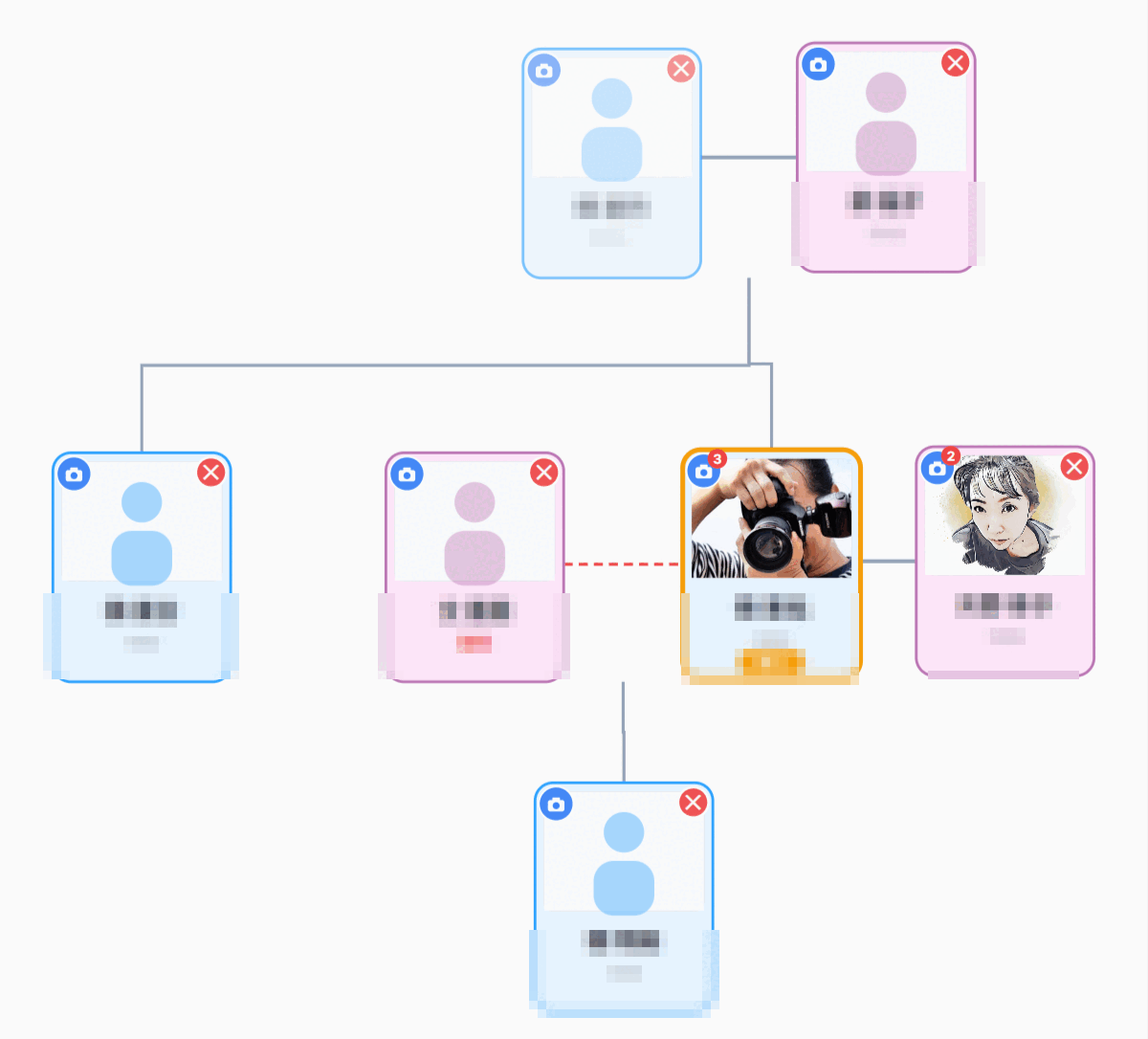
The Family Map draws your family's connections as a single chart, starting from you. You can zoom in, zoom out and move around with a fingertip, and it is easy to view even from a smartphone.
- Add family members based on yourself — Family members are always registered as “relationships as seen from you.” We keep things in order on the server side so that relationships don't break down, no matter who you start from.
- Relationship lines and relationships — Connections between spouses and between parents and children are shown as lines, and you can remove a relationship right there.
- Divorce badge — For records of a divorce where there is no current spouse, a small mark is quietly added so the facts are recorded correctly.
- Parents without names yet — Even ancestors whose names you don't know can be placed as blank cards. Once you enter a name, the card is automatically put in order.
- Printing and PDF sharing — You can print your completed Family Map as is, or save it as a PDF to share with your family.
New Feature 1: A Photo Gallery for Each Person
A small camera icon has been added to the top left of each card on the Family Map. Tap it to open a photo gallery just for that person. You can upload treasured photos and view them enlarged.
Each gallery has a share link. Only family members and relatives who know the link can view the photos, and no one can browse through a list to get into other people's photos. You can safely share your precious photos with just the people who need them.
New Feature 2: AI Storyteller — Your Family's Story, in Voice
Based on the family records you have registered, the AI Storyteller talks with you about your family. If you ask, “What kind of person was my grandfather?”, it answers within what is in the records. It is designed to be modest: rather than making things up, it tells you “That is not in the records” when something isn't recorded.
Stories can also be read aloud. It supports Japanese, Korean and English, and you can choose a voice with a calm tone. Even when following text is difficult, you can enjoy your family's story by ear.
New Feature 3: Anniversaries and Reminders
When you register special days such as birthdays, death anniversaries and wedding anniversaries, we will notify you automatically as the day approaches. You can choose to receive notices in the app, by push notification or by email. So that you never accidentally forget an important day.
New Feature 4: Google Calendar Integration
The special days registered in Family Storage can now be automatically synced with your Google Calendar. Simply turn on the integration in My Page settings, and your family's special days will appear in the calendar you look at every day. Alongside your plans, they will come to mind naturally.
New Feature 5: Use It Like an App (PWA)
You can add Family Storage to your home screen on your smartphone and use it like an app. There is no need to install anything from an app store. It launches quickly, and you can also receive (push) notifications. Your family's records, always close at hand.
Looking Ahead
With the Family Map at the center, we have brought together photos, stories, special days, calendars, and even an app-like experience — so that your family's story can be preserved more richly and for longer.
We will continue to grow the service little by little, listening to your feedback. We hope you enjoy the new Family Storage.


Comments (0)
No comments yet. Be the first to comment.